install.packages("a11yShiny")

library(a11yShiny)a11yShiny: Accessibility for R Shiny Apps
The a11yShiny R package allows for quick drop in wrapper of common R Shiny UI functions, making them more accessible to visually impaired users
The State of Accessibility in Web Apps
In 2016, the European Union adopted the Directive on the accessibility of websites and mobile applications targeted at public sector organizations. Its goal is to make websites and apps more inclusive for people with disabilities. Unfortunately, many websites remain inaccessible.
R Shiny and Accessibility
As an R Shiny developer, accessibility has not been my top priority. I develop a prototype with focus on the features with most business value. But often enough, when you work in the public sector or when your Shiny Dashboard is used by more people, accessibility becomes more important. The first thing I thought about was making colors in my plot colorblind-friendly and making sure contrasts are high. But digging deeper into the Web Content Accessibility Guidelines (WCAG 2.2) I learned about screen-readers, responsive layouts, tab focus, ARIA labels and so. I realized that ‘A11y’ is a short form for accessibility and that accessibility is not a simple function parameter you can switch on but that it requires an immense amount of work on R, HTML and CSS code… But wait, shouldn’t this be simpler?
Simplify Accessibility?
Yes, with the a11yShiny package which is now on CRAN. The a11yShiny package is a first shot at making accessibility in R Shiny as simple as a function call. It thereby follows the BITV-2.0, the German implementation of the European directive. The README describes in detail which of the BITV-2.0 criteria are fulfilled when using the a11yShiny wrapper functions.
Installation
You can install the latest version from CRAN directly and then call the library.
a11y_ shiny replacements for responsive layout, ARIA labels and tab focus
Instead of calling the usual shiny fluidPage, fluidRow, column and different Input functions (selectInput, radioButtons, etc.) you use the a11y_ wrapper functions.
a11y_fluidPage, a11y_fluidRow and a11y_column ensure responsive layouts. This is for when users want to increase the size of zoom and font without messing up the layout.
Code
library(shiny)

a11yShiny::a11y_fluidPage(
    lang = "en-US",
    title = "Demo",
      tags$hr(),
    a11yShiny::a11y_fluidRow(
      a11yShiny::a11y_column(4,
                             # this aria label you can see with your browser's developer tools
                             aria_label = "More accessible inputs",
                             offset = 8,
                             # Contrast mode button for all widgets
                             a11yShiny::a11y_highContrastButton())
    ),
  tags$hr(),
  a11yShiny::a11y_fluidRow(
      a11yShiny::a11y_column(
        4,
          shiny::radioButtons("radio_choice", "I am not accessible:",
            choices = list("Choice 1" = 1, "Choice 2" = 2, "Choice 3" = 3),
            selected = 1
          )
        ),
      a11yShiny::a11y_column(
        4,
        offset = 4,
          a11yShiny::a11y_radioButtons("radio_choice_acc",
                                       "I am accessible (hover me):",
            choices = list("Choice 1" = 1, "Choice 2" = 2, "Choice 3" = 3),
            selected = 1
          )
      )
  ),
    tags$hr(),
  a11yShiny::a11y_fluidRow(
    a11yShiny::a11y_column(
        6,
        div(
          id = "search-row",
          style = "display: flex; align-items: center; gap: 12px;",
          textInput("searchbox", label = NULL, placeholder = "Enter your question:", width = "100%"),
          actionButton(
            "do_search",
            label = NULL,
            icon = icon("search")
          )
        )
        ),
    #Composite Inputs for text and button
            a11yShiny::a11y_column(
6,
        div(
          a11y_textButtonGroup(
            textId = "text-acc",
            buttonId = "btn-acc",
            label = "Enter your question (accessible):",
            value = "",
            placeholder = NULL,
            button_label = NULL,
            button_icon = icon("search"),
            button_aria_label = "Search",
            controls = NULL,
            layout = c("inline", "stack"),
            # aria label describing the grouped input widgets
            text_describedby = "Enter your question and send it with click on search button",
            text_heading_level = NULL
          )
        )
    )
      )
)All a11y functions allow you to add Accessible Rich Internet Applications Label. ARIA labels are HTML attributes which make visual elements that lack visible text (e.g., icons, buttons without a label) understandable for users with visual impairments through a screen reader. And if you do not add a label description, an error message reminds you to do so ;)
Often enough, you have several input widgets that belong together. E.g. a chat textInput and a send actionButton. a11yShiny allows you to group inputs thematically by applying additional ARIA labels.
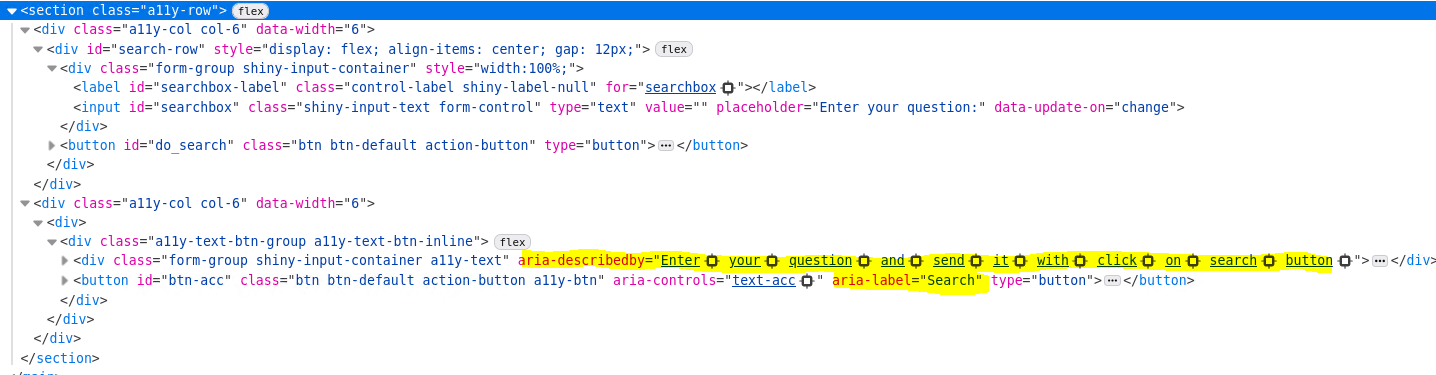
aria-label and aria-describedby attributes in the a11yShiny widget.
Another nice feature that comes with the a11y_ functions is the tab focus, making keyboard navigation easier by highlighting the current selection with a bold black frame.
Last but not least, there is a high-contrast button, which applies high contrasts to your input widgets.
Tables and Plots
And what is with all the different output plots and tables?
a11y_renderDataTable makes your DT table more accessible by setting language attributes and tab focus as default. It also allows for better contrasts and focus styling.
For plots (ggplot2), however, accessibility features cannot be applied reliably using wrappers functions as it has low flexibility and is error prone. Instead it is recommended to follow best practices using high-contrast palettes, distinct markers for different groups/lines, outlines for bars, and clear labeling.
What’s next?
Does this mean that every Shiny app using a11yShiny is automatically BITV-2.0 compliant? Unfortunately, no. The components need to be used correctly: labels must be meaningful, inputs should be grouped sensibly, keyboard navigation has to follow a logical order and users of assistive technologies need enough context. Also, accessible components alone do not guarantee that the whole website or application is accessible. BITV-2.0 compliance depends on the complete user journey and should always be checked with the right tools and, ideally, by accessibility experts.
The a11yShiny package is released on openCode licensed under the European Union Public Licence. It is a first shot on accessibility out of the box for R Shiny web applications.
I am looking forward to receive your feedback, ideas and pull requests! Please get in contact (Email, LinkedIn).
Many thanks to Annabel Malle and the team from d-fine GmbH for going the extra mile making this project happen!